Sample Widget

You can get our Tricks and Tips articles in your inbox each day for free. Just enter your email below:

Delivered by Master

This is default featured post 1 title

Go to Blogger edit html and find these sentences.Now replace these sentences with your own descriptions.This theme is Bloggerized by Lasantha Bandara - Premiumbloggertemplates.com.

This is default featured post 2 title

Go to Blogger edit html and find these sentences.Now replace these sentences with your own descriptions.This theme is Bloggerized by Lasantha Bandara - Premiumbloggertemplates.com.

This is default featured post 3 title

Go to Blogger edit html and find these sentences.Now replace these sentences with your own descriptions.This theme is Bloggerized by Lasantha Bandara - Premiumbloggertemplates.com.

This is default featured post 4 title

Go to Blogger edit html and find these sentences.Now replace these sentences with your own descriptions.This theme is Bloggerized by Lasantha Bandara - Premiumbloggertemplates.com.

This is default featured post 5 title

Go to Blogger edit html and find these sentences.Now replace these sentences with your own descriptions.This theme is Bloggerized by Lasantha Bandara - Premiumbloggertemplates.com.

Wednesday, May 18, 2011

How Lock Windows using USB Drive

Lock Windows with USB
Windows Security is the major issue now a days. Although everyone is worried about the security of his windows. Several softwares have been invented to protect data from being theft but either these softwares are very costly or are very difficult to understand. For the convenience of the User a trick has been discovered by me to protect your data from being theft which is "Lock your Windows using USB Drive".
Every body uses his USB Drive to store their data in it. But no one can think that this Small device can protect your PC. Anyways come back to the point, The logic is simple when ever you start your PC it searches for the Boot device which is being saved in BIOS. Your hard disk is assigned as the primary boot device by default. When it founds the device then computer searches for the Boot.ini file which contains the basic necessary Boot Information. So if you can somehow remove/rename the boot.ini file and save it within your USB Drive then you can possibly use this USB Drive as the passkey to boot your PC. This trick currentaly work with the Windows XP only.

Lets get started, First we have to configure the Windows XP to configure it follow the following steps:

1. First open the Folder Options, to open it you need to open any window either My Computer or Any HD Drive. Then Click on Tolls>Folder Options>View. Now simply do the following step mentioned in snapshot.

Uncheck all the Marked Fields

2. As the hidden system files get displayed, you will need to find the following files
  • boot.ini
  • NTDETECT
  • ntldr

3. Copy these files into your formatted USB Drive that you will use to lock your PC. As the files are being copied just remove the USB Drive.
4. After this rename the Boot.ini file to Boot.ini.bak. It will insure the backup of the original Boot.ini file which will be used to Revert back all settings.
5. Now we have to proceed to configure the Boot Priorities in BIOS. To open the Boot Priorities Restart your PC and press the F8 key to enter into your BIOS Settings. Though for some PCs F10,F12 and DEL keys are also assigned for BIOS Settings. If you are not sure about the Keys then you may have to read your Hardware Manual. As the BIOS Settings page opens Proceed to BOOT Priority and assign the USB Drive as Primary Boot Device.
6. Now Save settings and Exit the BIOS Setting Menu.
 
     Restart your PC without inserting the USB Drive, If your PC shows a Boot Error then it means that Boot.ini file is properly Renamed. Now insert the USB Device and Restart the PC. You will see that your PC will run properly same like that as it run earlier.

That's It all every time you have to use your USB device to Run the Windows.

To Revert Back:
To revert back all the settings simply by RUN the Windows and rename the Boot.ini file as it was before. There is no need to change the Boot Priority Settings. That's all remove you USB Drive and restart PC without inserting it.

Access Facebook When it is Blocked.


Facebook get Blocked

You may agree with me that Facebook is now become a daily need for its wide connectivity. However, in some circumstances it blocked by the higher authority to ensure professional working environment in corporate house, school, office, educational institute and so on. So, if you are in this type of situation don’t be tensed. Now we are going to describe some easy and convenient way to access Facebook when it is blocked.


Access Facebook with a secure web proxy

Using proxy server could be the best possible solution to access Facebook when it is blocked. Among various web proxy sites, one we found at www.securitales.com was the best.Because installation is not required for this server and it support almost all Facebook activities. It is secure enough and all the traffics are HTTP so everything encrypted here. It has a ten minutes free trial and the price is not so high.

Access Facebook using IP address

There are another easy option to access Facebook is using IP address. To do so follow the steps given below:
  • Go to ‘start’ menu and click ‘Run’
  • Type ‘cmd’ and click OK button
  •   In command prompt window type ‘ping facebook.com‘ 

You will see that IP address of Facebook appear soon. Now enter the IP address in your address bar and click enter. If you are lucky, Facebook may open.
Note: If you are not allowed to access administrative area of the computer or unable to open command prompt then try to find IP address of facebook with this online tool. 


Access Facebook with Opera Mini browser:

Another way to access Facebook is web version of Opera Mini browser.  Just open Opera mini demo link in your browser and you can access Facebook. 

Opera Mini generally used to surf web from mobile and a great way to access blocked website. If you want to use mobile version of Opera Mini, just go tohttp://m.facebook.com link.

OpenDNS method:

Using openDNS server could be a possible solution to access Facebook. Routers block some DNS request from all except few IPs. If you can change the machine’s DNS server to openDNS, it may work. If you want to know more about OpenDNS server click here. 
Hope you will find your suitable option here to access blocked Facebook. If you have any better idea, how to access blocked Facebook, you may write it in your comment.

How to open password protect files in winrar


Open Protected files in Winrar

You might have facing the problem like how to open password protected winrar files. Suppose you download a movie or something else by torrent or rapidshare and try to open it. Then a message written ‘Enter password for the encrypted rar file’ possibly shocks you. In this situation, if you have RAR Password Unlocker it will be easy for you to solve the problem. RAR Password Unlocker 3.2 is design to crack the lost password of your winrar or rar file. RAR Password Unlocker supports all versions of the winrar or rar archive. RAR Password Unlocker can recover any password no matter how long and how complex it is. Enhanced by brute-force attack, brute-force with mask attack, dictionary attack it works effectively and efficiently. Moreover, the tool is too easy to use that even a novice user can do it.   

Systematic process of open password protected winrar files:

Please follow the instruction given below to recover winrar password easily by RAR Password Unlocker 3.2.
  • Firstly, open RAR Password Unlocker. Go to file and click open or click on the browse button as you see in the image below. 


  • Select the rar or winrar file from your computer that you want to retrieve password. After selection, click Open button.
  • Select brute-force attack (trying all possible combinations).
  • Now click start button to initiate the program.
  • The program is processing to retrieve the password. After sometime a message box pops up to you displaying the expected password to you. Now click ok. 
I can also recommend you some software product that can help you to recover lost password. Some of these products are free and some you have to buy. The prices of the product varied according to their effectiveness. The free trial version can retrieve up to three-character length password. Therefore, if you have a longer password to retrieve then you have to buy the software

How to Remove and Prevent the Mac Protector Malware


image

Every Apple fanboy will tell you that Macs are safe from malware, but it’s just not true. Recently a fake AV program has been targeting and infecting OS X computers in the wild. Here’s a quick look at how it works, how to remove it, and also how to prevent it in the first place.
The virus in question is actually a fake antivirus and trojan which goes by a few different names. It may present itself as Apple Security Center, Apple Web Security, Mac Defender, Mac Protector, and possibly many other names.
Note: we encountered this malware on a handful of user workstations at my day job, and then spent some time doing analysis of how it works. This is a real piece of malware, that’s really infecting people.

Screenshot Tour of a Mac Protector Malware Infection

The infection comes about from a webpage redirect which will present the user with the following page, that makes it appear like a real Mac OS X popup dialog.
image
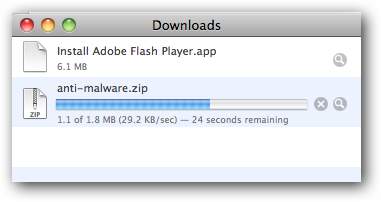
If the user clicks remove all they will immediately begin downloading a package which will install the virus.
Once downloaded your computer will probably automatically begin installation. Luckily, for now, you still have to manually walk through the installation process. As more vulnerabilities are found this will probably change in the future just like it has for Windows’ users in the past.
Note: This was installed on a fully patched fresh install of OS X 10.6.7 with Symantec Endpoint Protection 11.0.6 fully up to date.
The installer will start and you will need to walk through the normal OS X process. Users will also be prompted for a username and password with administrative rights during the installation.
You may notice the new shield-like icon in the menu bar.
The program will automatically run and pretend to be loading some sort of database for what we can assume is virus definitions.
You will then be barraged with notifications and popups letting you know about your fake infection.
Just like fake antivirus programs on Windows, if you click on the cleanup button or on one of the notifications you will be told that your software is not registered and needs to be paid for.
If you click on the register button you will be asked for your credit card information.
Note: Do not fill out, submit, or even type your credit card info in this window.
If you close out of this window you will be asked to put in your serial number to continue.

Mac Protector/Defender Removal

To remove the virus close out of all of the windows with either the command+Q keyboard shortcut or click the red orb in the top left corner.
Now browse to your hard drive -> Applications -> Utilities and open the Activity Monitor. Locate the MacProtector process and click quit process.
Confirm the pop-up asking if you are sure you want to quit the process.
Open your Apple menu and select system preferences.
Select Accounts from the new window.
If you are not able to edit your account settings click on the lock in the lower left corner of the window and put in your admin password.
Select your user from the left and then click the login items tab. Select the MacProtector entry and then click the minus (-) button at the bottom of the window.
Close out of system preferences and go back to your Applications folder. Find the MacProtector application that was installed and either drag it to the trash, right click and move to trash, or drag to your favorite app zapper program.

How to Prevent Getting the Virus

There are some precautions you can take in getting this virus. First of all, use common sense when browsing the internet. If the website looks suspicious or the warnings look fishy, don’t click on them.
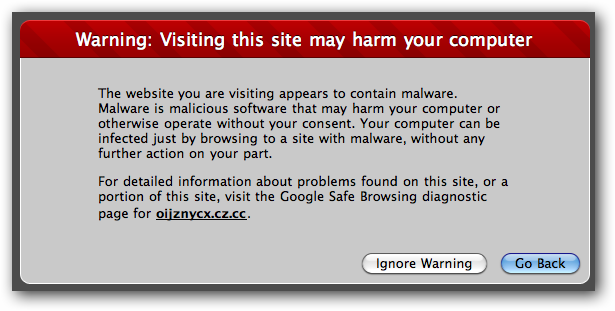
There will also probably be other warnings that something may contain a virus. For instance, the virus I managed to download was later flagged by Google as being harmful to my computer.
If you are using Safari you should also disable the setting to automatically open “safe” files after downloading. Go to your Safari preferences and uncheck the box to disable this setting.
You should also scan your downloads with an antivirus program. When the installer package is scanned with Symantec Endpoint it detects the virus immediately.
If you don’t have Symantec on your Mac, the Windows scanner also has definitions to detect this virus.
Have you encountered a Mac OS X malware infection in the wild? Be sure to share with your fellow readers in the comments.

Tuesday, May 10, 2011

Microsoft betting Skype keeps it ahead of Google, Apple


Microsoft's Steve Ballmer and Skype's Tony Bates discuss Microsoft's $8.5 billion acquisition of Skype at a San Francisco press conference.
(Credit: Jay Greene/CNET)
Here's why Microsoft's $8.5 billion acquisition of Skype makes sense: Microsoft, still a laggard on the Internet, has landed one of the most popular brands on the Web with a deeply engaged base of users. And it can bake Skype's widely used technology into its communications products, making them better.
At least, that's the bet. Microsoft says Skype has more than 170 million connected users. According to a regulatory filing, Skype claims its users made 207 billion minutes of voice and video calls last year. Microsoft wants to capitalize on that loyalty, putting Skype technology into various products, hoping that it can spin Skype's users into other Microsoft products.
"The Skype brand is a verb," Microsoft CEO Steve Ballmer said at a press event in San Francisco this morning, several hours after the acquisition plans were announced. (And just as the keynote address at the Google I/O developer conference was about to get started just a few blocks away.)
There are plenty of questions about whether paying $8.5 billion makes sense. But for Microsoft, which at the end of the most recent quarter reported that it was sitting on $50 billion in cash, it's not really the right question. Microsoft has poured billions of dollars into businesses over the years to find new markets. Some are starting to pay off, such as itsXbox video game business. And others are still a long way away from making money, such as its online services division.
 
For Microsoft, the question is whether Skype allows it to get ahead of rivals, particularly Google and Apple, in key consumer market. Skype offers that potential.
"Today's announcement underscores who we are as a company," Ballmer said in an e-mail to employees. "We are ambitious and forward looking. We have big goals and aspirations. And when we look into the world and see opportunities to do more with technology, we'll drive toward them and keep pushing."
The regulatory filing, which Skype sent to the Securities and Exchange Commission in advance of an initial public offering that won't happen now, said that the company lost $7 million on $850 million in net revenue in 2010. And earnings before interest and taxes, a measure growing companies use to view profits, was $246 million for the year. In just the most recent quarter, Microsoft posted $5.7 billion in operating income.

Skype dreams

Does Skype make sense for Microsoft?

  • Yes indeed.
  • I'll withhold judgment for now.
  • No way.
VOTEView results

But Microsoft doesn't have to turn Skype into a standalone profit center. It has businesses that can be improved by baking Skype technology into them. At least, that's the bet. Microsoft can add Skype to a portfolio of real-time communications products, that include Outlook, Messenger, Hotmail, Xbox Live and Lync. And it can add Skype into Windows Phone.
"We dream about building experiences that aren't limited by distance and device," Ballmer said at the San Francisco event, speaking about things like distance learning and family gatherings via video. "Microsoft and Skype together will define this future and what it looks like."
Ballmer talked about a recent conference at his son's school, and how he battled traffic to get there in time. As he was racing there, he thought about the camera that was inevitably on a computer in the school and its wireless network. He could have done the meeting from his office. "There's a better way to do these things," Ballmer said.
Just as important, Microsoft can try to sell Skype users on other Microsoft products, connecting them to one another through products such as Outlook. The deal has the potential of making Microsoft's existing communications products more valuable. It also could give those customers less of a reason to use rival technology from Google and Apple.
Microsoft plans to bake Skype's technology into a variety of products--everything from its Lync unified communications software to its Kinect motion-sensing device for the Xbox. As widely used as Skype is, Microsoft thinks it can build an even bigger base of customers. Microsoft can help push Skype into everything from business meetings to distance learning to family get-togethers. "We want to extend the reach of Skype," Ballmer said.
And it has a bit of history in weaving acquired technology into existing businesses. In 2007, Microsoft acquired speech recognition company Tellme Networks for $800 million. It currently uses that technology to let users search the Web with Bing by speaking a query into their mobile phone. Kinect uses Tellme technology to let gamers control their Xbox with voice commands.
That's why Ballmer gushed that the deal is "much more than the sum of its parts."
And it's why Microsoft is willing to shell out more than it's ever paid for an acquisition. (It's $6 billion deal for Aquantive is now ranked number two.) Unlike Skype's previous owner, eBay, Microsoft actually has some synergy with the company. Its real challenge won't be making money from Skype. It will be figuring out how to use Skype to make Microsoft's products better.

Survey: 7.5M Facebook users below minimum age


A survey published in the June issue of Consumer Reports (available now) found that "of the 20 million minors who actively use Facebook," 7.5 million were younger than 13 and more than five million were younger than 10. Facebook's terms of service require that users be at least 13.                                                                  
The report tracks with other studies including a 2010 study by McAfee that found 37 percent of 10 to 12 year olds are on Facebook and a study (PDF) released in April from the London School of Economics EU Kids Online project that found that 38 percent of 9- to 12-year-old European children used social-networking sites, with one in five using Facebook, "rising to over 4 in 10 in some countries."
Jeff Fox, technology editor for Consumer Reports, said it was troubling that the survey found "a majority of parents of kids 10 and under seemed largely unconcerned by their children's use of the site." In a press statement, Consumer Reports said that "Using Facebook presents children and their friends and family with safety, security and privacy risks" and that, "In the past year, the use of Facebook has exposed more than five million online U.S. households to some type of abuse including virus infections, identity theft, and--for a million children--bullying."
In an statement issued ahead of the report's release, Facebook said that "recent reports have highlighted just how difficult it is to implement age restrictions on the Internet and that there is no single solution to ensuring younger children don't circumvent a system or lie about their age." The company said that "we appreciate the attention that these reports and other experts are giving this matter and believe this will provide an opportunity for parents, teachers, safety advocates, and Internet services to focus on this area, with the ultimate goal of keeping young people of all ages safe online."
No silver bullet 
The problem is that Facebook and virtually all other social-networking sites rely on information provided by the user. Although Facebook has systems designed to try to catch people who lie about their age, they are far from perfect. And the problem isn't easy to fix.
In 2009, I served on the Internet Safety Technical Task Force, which was formed by 49 state attorneys general and MySpace to investigate, among other things, whether age verification technology could be used to help keep under-aged kids off of social networks and to limit inappropriate contact between online children and adults. The Task Force's Technical Advisory Board, which consisted of computer scientists and other technology experts from leading universities and companies, looked at a wide range of technologies and concluded that there is technology that can be used to verify the age and identity of adults but not children. Most age verification systems rely on things such as credit reports, real estate transactions and criminal records which--for the most part--aren't available for children. The board found that "public records of minors range from quite limited to nonexistent."
The Task Force's findings were not all that different than Facebook's own recommendation "that communication between parents/guardians and kids about their use of the Internet is vital." Facebook requires that users enter their date of birth and if a person enters a birth date that puts them under 13 and later tries to amend that date, a cookie placed on the machine will attempt to prevent them from registering again. That may catch some kids who have trouble subtracting 13 from 2011, but most kids who try will slip right past. Facebook says that it also uses technology and user reports to try to find and delete the accounts of under-age users.
Unintended consequence of Federal law
One of the main reasons Facebook restricts use to people 13 and older is because of the Children's Online Privacy Protection Act (COPPA), a 1998 law that requires Web sites to get parental permission before it can make any use of data provided by children younger than 13. Facebook could create a service that is COPPA compliant, but it would be expensive and likely require not only changes to the terms of service but modifications to its privacy and advertising policies for pre-teen users. Facebook currently has somewhat different privacy policies in place for users between 13 and 18, but no programs for users younger than 13.
Good advice
Consumer Reports recommends that parents monitor their children's accounts. That can be done by requiring your child "friend" you, but there are also tools available such as SafetyWeb, SocialShield, and ZoneAlarm SocialGuard, which (for a fee) help parents monitor their child's social Web use without necessarily having to friend them.
The magazine also recommends that young people turn off Facebook's Instant Personalization feature, that they "use apps with caution," and "utilize privacy controls." A Parents Guide to Facebook (which I co-wrote along with Anne Collier) is a free online guide that offers detailed instructions on how to set privacy controls for children and teens and adults too.


Twitter Delicious Facebook Digg Stumbleupon Favorites More